


QR Scanner, All Barcode Scan
3.613.00 Reviews
App Specs
- Version
- 1.2.1
- Updated On
- License
- Free
- Downloads
- 500,000+
- Developer
- Studio Rankvn
- Categories
- Productivity
- Platform
- Android
Screenshots
 Analysis by AppCompare
In a shared household, a QR code can be a small nuisance: one person spots it on a parcel, another needs the product page, and someone else wants to save the details for later. QR Scanner, All Barcode Scan is aimed at making that quick handoff easier, with a camera-based way to read codes and create QR codes of your own. I see its appeal less as a tool for constant use and more as a handy utility to keep available when a code is the shortest route to information.
A useful tool for the moments a code gets in the way
A practical household example is checking a label on a kitchen appliance. I can scan its barcode while unpacking it, then keep the result available rather than trying to remember what I found when I later compare products or look for the right details. A QR code on a notice, menu, or instruction sheet can be just as useful: scanning saves the step of typing a web address by hand. The benefit is modest but real, especially when a code is small or awkwardly placed.
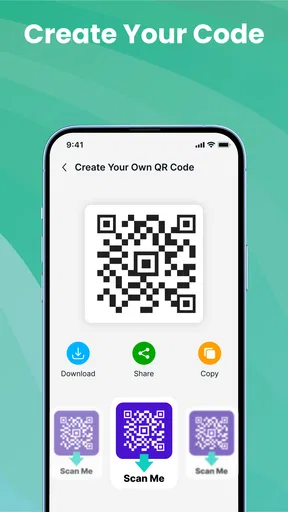
Creating a QR code adds a different use. You might make one for information you want to share with someone in the home, or put on a personal note or printed sheet. Before sharing, I would check the destination and consider who will be able to see the code: a QR code is a convenient doorway, not a privacy boundary. Anyone who can scan it may be able to reach whatever its contents point to.
What to consider before sharing a device
The app is a productivity utility from Studio Rankvn, and its straightforward purpose makes it easy to understand without a long setup process. Still, a scanner used on a shared phone can leave a trail of results that the next person may see. I would treat scan history as useful personal reference, not as a private account or a reliable way to separate household members. If different people use the same device, they should avoid scanning anything they would not want another device user to encounter.
It is also worth being deliberate about what happens after a scan. A code may lead to a website or other content, but scanning a code does not by itself tell you whether the destination is trustworthy. I pause before opening an unfamiliar result, particularly if the code is on a flyer or package from an uncertain source. That small check is a better habit than assuming every printed square is safe just because a scanner can read it.
Age context and everyday trust
The app is rated for Everyone, which makes its basic scanning purpose broadly approachable, but that rating should not be mistaken for a guarantee about the destinations people scan. A QR code can lead to content chosen by whoever made it. For children using a shared phone, I would explain that they should ask before opening an unfamiliar link, just as they would with a message or web search. The app is a reader and creator, not a substitute for an adult’s judgement about what a code leads to.
That distinction matters in a household because the scanner itself can feel neutral: point the camera, get a result, move on. In practice, the useful decision comes after the scan. I would use it freely for familiar product labels or a known household notice, and be more cautious with codes that arrive unexpectedly or ask for personal information. This is a sensible boundary even when the app is being used by adults.
Worth Reading Before You Choose

EA SPORTS FC Mobile 26 Is a Bigger Football Game, but It Takes Time

Flipboard Shows What News Apps Must Do Beyond the Feed

Switching to Android Auto Means Rethinking Your Driving Routine

Google Calendar Makes a Crowded Week Easier to Manage

Ludo King Makes the Most of the Minutes Between Plans

Baby Panda World Brings Quick Play to Modern Phones, but Its Game Library Feels Busy
Getting Started with QR Scanner, All Barcode Scan
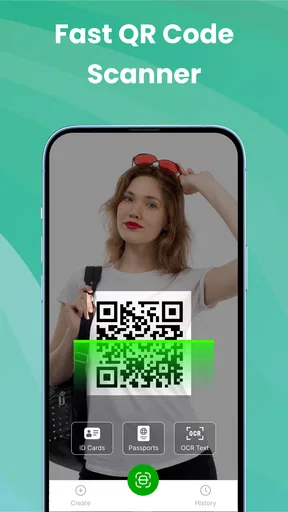
Setting up the QR Scanner, All Barcode Scan is as simple as pie. Available for both Android and iOS, just head to your app store, download, and you’re ready to roll. The interface is straightforward, which means no time wasted figuring out how to use it. You open the app, point your camera at a QR code or barcode, and let the magic happen. The app immediately deciphers the code and presents you with the information it holds.
Features That Stand Out
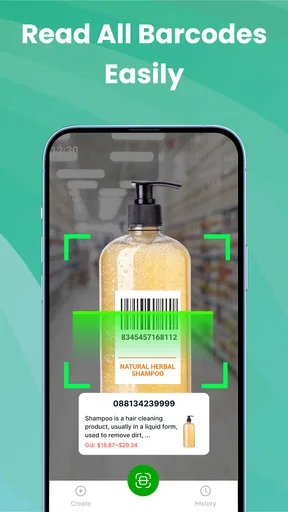
One of the coolest things about this app is its versatility. It doesn’t just stop at QR codes – it handles a range of barcode types too. Whether you’re scanning for a product price check, accessing a URL, or gathering information from a contact card, this app’s got you covered.
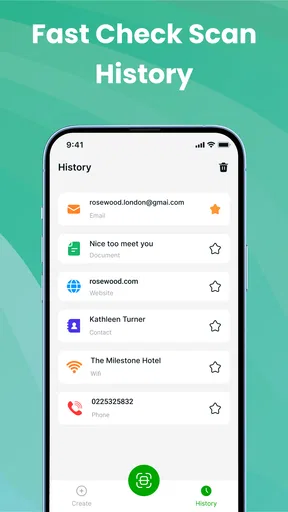
What I really love is the history feature. Every code you scan is saved in a history log, so if you need to revisit something, it’s right there at your fingertips. No more trying to remember what that awesome website was, or which product you wanted to compare prices for later. You can even organize your scans into categories, keeping everything neat and tidy.
Making scan history work for you
History is most useful when I treat it as a short working notebook rather than a permanent filing system. If I scan several products while shopping, I can return to the results later and compare them without reopening every package or trying to recall which barcode belonged to which item. A practical habit is to review the saved scans while the purpose is still fresh, then remove or ignore anything I no longer need. That keeps a useful record from becoming a confusing pile.
Categories can help when scans belong to different parts of life, such as household purchases and useful links. I would keep the labels simple and consistent instead of creating a category for every one-off task. This is a small workflow choice, but it makes the history easier to search by eye when I am in a hurry. On a shared device, however, categories do not create separate personal spaces; anyone using the phone may still encounter the stored material.
Performance and Usability
Performance-wise, the app is a speed demon. It scans codes in a flash, and I’ve yet to encounter a code it couldn’t read. Whether on a product’s packaging or a digital screen, the app’s precision and speed make it a real powerhouse.
Usability is another plus. The app is intuitive, making it accessible for everyone, whether you’re tech-savvy or not. The straightforward interface means you don’t spend ages figuring out what to do next. You just scan and go. Plus, the app’s design is clean and uncluttered, focusing on functionality rather than unnecessary frills.
Where a dedicated scanner fits
For an occasional scan, the camera or built-in tools already available on many phones may be enough. I would not install a separate app just to read one QR code once. A dedicated scanner makes more sense if you regularly move between QR codes and product barcodes, want a place to revisit scans, or expect to create codes as part of ordinary tasks. The trade-off is another app to keep on the phone and another interface to learn, even if the learning curve here is gentle.
It is not a full product research service, either. Reading a barcode can identify or expose information associated with it, but a scan alone does not guarantee a current price comparison or tell you whether an item is the right choice. I would use the result as a starting point, then check a retailer or trusted source when the decision matters. That distinction helps avoid expecting a scanner to do the work of a shopping or research app.
Privacy and Security
In today's digital age, privacy is a big deal. Thankfully, QR Scanner, All Barcode Scan respects that. The app doesn’t collect unnecessary data, and you’re not bombarded with intrusive ads, which is a breath of fresh air. You can use it with peace of mind, knowing your scanned data isn’t being sold off to the highest bidder.
For me, the most useful privacy habit is to think about the scanned destination and the device’s audience separately. A familiar code may be harmless to open, while its result might still be visible later to someone who shares the phone. If I use a shared device, I avoid scanning sensitive material and remember that a history log is convenient precisely because it retains results for later. Convenience and discretion are not always the same thing.
Cost, fit, and expectations
The app is free to download, with in-app purchases listed from $4.99 to $49.99 per item. I would start by checking whether the free experience covers my routine needs before paying for anything. The presence of purchases does not mean every household needs them; for occasional label checks and QR links, the basic idea may be all someone wants. If you are choosing a scanner mainly for one simple task, compare that need with the phone’s built-in option first.
It has an average rating of 3.6 from 268 ratings, with 13 written reviews, and has passed 500K+ installs. Those figures suggest that people are using it, but they are not a substitute for deciding whether its workflow suits you. The current version is 1.2.0, it was released on Oct 28, 2025, and it requires Android 8.0 or later. The age rating is Everyone. These details make it easier to judge compatibility and household suitability, while the actual value comes down to how often you scan and whether you want a dedicated history.
Why You Need This App
If you’re someone who loves efficiency and having information at your fingertips, this app is a must-have. It’s perfect for price comparisons, accessing online content quickly, or simply feeding your curiosity about the world around you. Plus, it’s a fantastic tool for businesses to engage with customers more interactively.
For a small business or a household organizer, creating a QR code can be useful when you want to point someone toward information without asking them to type it out. I would still test the code with another device before printing or sharing it widely. That catches a mistyped destination while the fix is easy. For one-to-one coordination, sending the link directly may be simpler; a QR code is more helpful when it will be seen on paper, a screen, or a shared notice.
And let’s not forget those times when you’re out and about, and your data plan is running thin. The app can cache scans so you can explore them later when you’re back on Wi-Fi. Handy, right?
Who should choose it, and who can skip it
I’d recommend considering it if you scan codes often enough to value having QR and barcode reading together, or if you want to create QR codes without turning to a separate tool. It can suit someone who shops with a list, checks labels around the home, or collects links from printed materials and wants to revisit them. The saved-history workflow is particularly useful when a scan is only the first step and the actual comparison or decision happens later.
I would skip a dedicated scanner if my phone’s built-in camera already handles the few codes I encounter, or if I need a shared family system with separate accounts and carefully divided records. Nothing about a simple scanner should be treated as household coordination software. A note, message, or shared list may be better for assigning a task or recording who has checked something. Choosing the right tool depends on whether the problem is reading the code or organizing what the household does with the result.
Final Thoughts
In a nutshell, QR Scanner, All Barcode Scan is a powerhouse pocket tool that makes life a little bit easier. Its speed, efficiency, and user-friendly interface make it a standout choice among barcode and QR code scanning apps. Whether you’re tech-savvy or just looking for a convenient way to access information, this app is definitely worth a spot on your home screen.
So, next time you’re curious about a product or need to quickly access a website, remember to pull out your phone and give this app a whirl. You might just find that it becomes one of your most used apps!
My household verdict
For shared use, I see this as a practical scanner, not a family-management solution. It can make product checks, printed links, and simple QR sharing less fiddly, but people still need to agree on what they scan, what they save, and whether a result is safe to open. I would keep it on a household phone if several people regularly need to read codes and understand that the history is shared. If privacy boundaries or separate personal records matter more, each person’s own device or a different workflow is the better fit.
Overall, the app’s strongest case is convenience: it brings scanning and code creation into one focused utility and gives you a way to return to earlier results. Its limits are equally important: a scan does not verify a destination, replace a price-search service, or coordinate people by itself. With those expectations in place, I’d find it useful for everyday household errands without treating it as something every phone needs.
Pros
- Fast and accurate scanning capabilities.
- Supports a wide range of barcode types.
- Easy-to-use interface for all users.
- Works offline for quick access.
- No intrusive ads during scanning.
Cons
- Limited editing options for scanned data.
- Occasional issues with low-light scanning.
- Some features locked behind premium.
- No batch scanning option available.
- Minor bugs on older devices.
FAQs for QR Scanner, All Barcode Scan
What features does the QR Scanner, All Barcode Scan app offer?
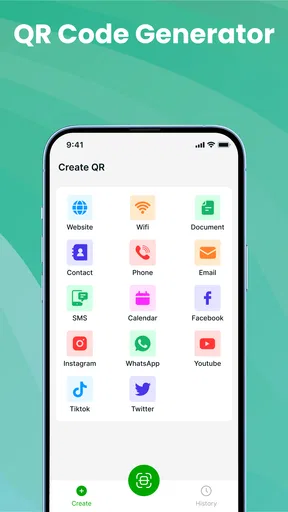
The QR Scanner, All Barcode Scan app provides a comprehensive suite of features, including the ability to scan all major barcode formats and QR codes. It also offers functionalities like product information retrieval, price comparisons, and the ability to generate your own QR codes. The app is designed to be user-friendly with a simple interface.
Is the QR Scanner, All Barcode Scan app available for both Android and iOS?
Yes, the QR Scanner, All Barcode Scan app is available for download on both Android and iOS platforms. Users can find it on the Google Play Store and Apple App Store. It supports a wide range of devices, ensuring that most smartphone users can take advantage of its features.
How does the QR Scanner, All Barcode Scan ensure user privacy and security?
The app prioritizes user privacy by not storing scanned data on external servers. It processes all scans locally on your device. Additionally, it requires minimal permissions, ensuring that users have control over what data the app can access, thereby maintaining a high level of security.
Is the QR Scanner, All Barcode Scan app free to use?
The app is free to download and use for basic scanning features. However, it offers in-app purchases for advanced features such as ad removal and enhanced scanning capabilities. This allows users to choose a level of service that fits their needs and preferences while supporting the app's development.
Can the QR Scanner, All Barcode Scan app scan barcodes in low-light conditions?
Yes, the app includes a built-in flashlight feature that enhances its ability to scan barcodes and QR codes in low-light conditions. This ensures that users can effectively use the app in various environments without compromising on functionality or accuracy.


